Staying protected against unexpected job loss requires keeping your social security policy active in the Emirates. If your Involuntary Loss of Employment coverage is approaching its expiry date, completing your ILOE renewal on time prevents policy cancellation and avoids government penalties. Whether you work in the private sector or the federal government, maintaining this mandatory safety net ensures you remain eligible for cash benefits if your employment ends due to reasons other than resignation or disciplinary action.
This guide covers everything you need to know about the renewal process, including the required fees, step-by-step online instructions, payment methods, and UAE government rules regarding deadlines.
ILOE Insurance and Why Renewal Matters
Introduced under federal regulations, the ILOE scheme provides temporary financial relief to workers who face sudden job termination. Eligible employees receive monthly cash compensation equal to 60 percent of their average basic salary over the previous six months. However, these benefits rely entirely on active policy status and consistent premium payments.
Failing to renew your policy before it expires leads to coverage gaps. According to UAE regulations, if you allow your payments to lapse for more than 90 consecutive days, your insurance can be cancelled. Maintaining a continuous subscription history is a strict prerequisite for filing any future claim, as you must have paid premiums for at least 12 consecutive months prior to job loss.
ILOE Insurance Renewal Cost and Categories
The UAE government has kept the cost of this social security scheme affordable. The pricing structure depends entirely on your basic monthly salary bracket:
- Category A: For employees with a basic salary of AED 16,000 or less, the premium is AED 5 per month (totaling AED 60 per year, excluding VAT).
- Category B: For employees with a basic salary above AED 16,000, the premium is AED 10 per month (totaling AED 120 per year, excluding VAT).
When you process your renewal, you can select a policy period of one year or two years. Full VAT is typically added during the first payment installment.
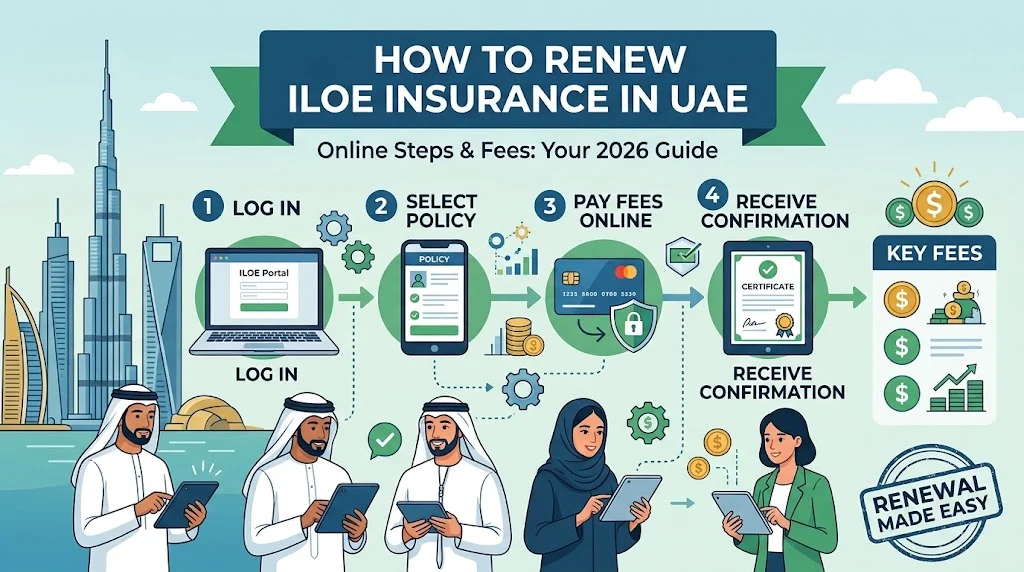
Step-by-Step Guide to Renewing ILOE Insurance Online
The digital transformation across the UAE makes completing your insurance renewal quick and straightforward. You can finish the entire process from your laptop or smartphone in just a few minutes without visiting an office.
Step 1: Access the Official Portal
Open your web browser and navigate to the official ILOE insurance website or open the official ILOE mobile application on your device. Avoid using unverified third-party links to protect your personal information.
Step 2: Select Your Employment Sector
Click on the subscription or renewal option on the homepage. You will need to choose your specific sector. Select Private Sector, Federal Government, or Free Zone (listed under non-registered in MoHRE, where applicable).
Step 3: Enter Your Identification Details
Input your Emirates ID number or your Unified Identification (UID) number correctly into the designated field. Click confirm to proceed to the verification stage.
Step 4: Verify via OTP
The system will send a One-Time Password (OTP) to your registered mobile number. Enter this code on the screen to securely log into your personal dashboard.
Step 5: Review and Select Renewal
Once logged in, check your existing policy details, personal information, and current expiry date. Look for the renew option, select your preferred policy validity of one or two years, and check the calculated payment amount.
Step 6: Complete Secure Payment
Pay the renewal fee using a valid Visa or Mastercard debit or credit card, or select digital wallets like Apple Pay where available. Processing your payment directly through the official portal or app ensures you incur zero additional service charges.
Step 7: Download Your Updated Certificate
After successful payment, save the digital receipt and download your newly issued insurance certificate as a PDF. Keep a copy accessible for your human resources records.
Alternative Offline Renewal Channels
If you prefer assisted processing or encounter technical difficulties with online portals, you can visit approved physical service centers across the UAE. Authorized exchange houses and typing centers such as Al Ansari Exchange branches, Tasheel centers, and Tawjeeh centers handle renewals. Keep in mind that utilizing these third-party offline channels may incur a small additional service fee in addition to your standard insurance premium.
Penalties and Fines for Late Renewal
Staying mindful of your policy timeline helps you steer clear of financial penalties. The UAE authorities enforce clear rules for late payments:
- Delayed Subscription Fine: A fine of AED 400 applies if eligible workers fail to subscribe initially within four months of starting a new job.
- Missed Payment Fine: A fine of AED 200 applies if you fail to pay your scheduled insurance premiums for more than 90 days.
If your policy is cancelled due to prolonged non-payment, you may be required to clear all outstanding fines and purchase an entirely new policy rather than simply renewing the old one.
Common Renewal Issues and How to Fix Them
While the digital platform runs smoothly most of the time, users occasionally experience minor hiccups:
OTP Not Received: This usually happens if your phone number changed after your initial registration. Ensure your details are updated with the federal authorities, or contact customer support for assistance.
Payment Gateway Errors: If your card transaction fails, verify that 3-D Secure is enabled on your bank card, or switch to an alternative debit or credit card issued by a UAE bank.
Expired Emirates ID: If your Emirates ID recently expired, the system will block policy actions. Always renew your official identification documents first before attempting to update your insurance portfolio.
Frequently Asked Questions
When should I start my ILOE renewal process?
It is best to start your renewal during the final 30 days before your current policy expires. This proactive approach prevents unexpected technical delays and ensures your coverage remains completely uninterrupted.
Can I check my expiry date without logging in?
You need to log into your account using your Emirates ID and an OTP to view your specific policy dashboard, exact expiry date, and payment history.
What happens if I lose my job during the grace period?
While a grace period allows time for payments, filing an insurance claim while your account is unpaid or lapsed can result in immediate rejection by the provider. Keep your policy active at all times to protect your claim eligibility.
Who can I contact if I need help with my renewal?
You can reach out to the official ILOE customer care team through their dedicated helpline at 600 599 555 or submit an inquiry via their online support portal.